Ignite Your Visuals with Fire Ember Overlay Backgrounds
There's a specific kind of magic in the glow of embers. It's the warmth of a distant campfire, the intensity of a forge, or the dramatic aftermath of a sparkler held against the night sky. Capturing that authentic, floating energy in digital work is notoriously difficult to do from scratch. That’s where a dedicated asset like the Fire Ember Overlay Backgrounds collection comes in, offering a shortcut to that captivating, cinematic heat without the need for complex particle simulations or risky live-fire photography.
More Than a Texture: The Anatomy of a Fiery Atmosphere
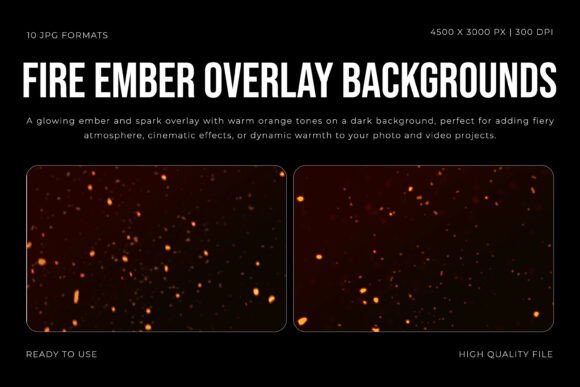
At first glance, you might categorize this as just another set of textures. But look closer, and you'll see it's a carefully engineered tool for mood. The collection features ten distinct high-resolution JPG files, each at a robust 4500x3000 pixels and 300 DPI. This isn't about slapping a generic pattern onto a background; it's about compositing layers of light. The visual personality here is one of dynamic, organic motion. Each overlay captures the unique dance of individual sparks and embers, suspended in air with a soft, realistic glow that bleeds naturally into the surrounding darkness. The warm orange tones are rich but not oversaturated, providing a versatile base that can be tinted cooler or warmer in post-production.
The appeal lies in its depth and contrast. A good overlay doesn't just sit on top; it interacts. These embers are rendered with a sense of three-dimensional space, some appearing sharp and close, others soft and distant. This creates a natural visual hierarchy that draws the viewer's eye. The dark background isn't merely black; it's a deep, nuanced void that makes the ember particles pop with stunning clarity. For a designer, this translates to instant atmosphere. It's the difference between a flat image and one that feels alive with energy and story.
Practical Firepower: Where This Collection Shines
The true value of a design asset is measured by its utility across projects. The Fire Ember Overlay Backgrounds are a workhorse for anyone needing to inject warmth, motion, and a touch of drama. Think beyond simple photo effects. This is a tool for brand identity and visual storytelling.
- Cinematic & Editorial Design: For book covers, especially in fantasy, thriller, or romance genres, these overlays add a literal spark to the composition. Use them to frame a title, highlight a character's silhouette, or create a dramatic chapter header. In editorial layouts for magazines or blogs, a subtle ember overlay can transform a standard feature image into a captivating cover story.
- Digital Marketing & Social Media: In the endless scroll of a social feed, motion and light stop thumbs. Apply a subtle animation to the embers for a video intro, use a static overlay as a compelling background for a text-heavy Instagram story, or create a standout banner for a summer sale, a festival announcement, or a podcast about adventure. It's a professional touch that elevates social media graphics from amateur to polished.
- Branding & Packaging: For a craft brewery, a hot sauce brand, a candle maker, or a musician, fire is a core part of the sensory experience. These textures can be integrated into packaging design, used in website hero images, or applied to merchandise mockups to reinforce the brand's core message of heat, passion, or intensity. It's a subtle form of modern typography in action—using light as a communicative element.
- Personal & Creative Projects: The applications are equally powerful for personal use. Create a stunning digital scrapbook page for a bonfire gathering, design a unique wedding invitation for a fall ceremony, or add a magical element to a family portrait. For crafters, printed on transfer paper, these embers could embellish custom tote bags or t-shirts.
Integrating the Glow: A Designer's Practical Guide
Simply having the asset isn't enough; effective integration is key. Here’s how to think about using the Fire Ember Overlay Backgrounds in your workflow.
Evaluating Fit and Hierarchy: First, assess your project's tone. This overlay speaks of energy, passion, danger, and warmth. It might overwhelm a serene, minimalist design but will perfectly complement a dynamic one. Consider the visual hierarchy of your piece. The embers are a powerful secondary element. They should enhance your primary subject (a product, a person, a headline), not compete with it. Use layer masks and opacity controls to guide the viewer's eye, allowing the embers to cluster around focal points or trail off to create depth.
Font Pairing and Readability: Pairing is crucial. The organic, chaotic nature of embers pairs beautifully with clean, structured typefaces. A strong sans serif font for headlines provides a stable anchor, while a delicate serif font can offer an elegant contrast for body copy. Avoid overly ornate script fonts or handwritten fonts that might get lost in the texture. Always test readability rigorously. Place your text over the overlay and check it at various sizes. You may need to add a subtle gradient, a solid color block behind the text, or significantly reduce the overlay's opacity to ensure clarity.
Technical Execution: In your editing software (Photoshop, Affinity Photo, etc.), place the overlay layer above your image and experiment with blending modes. Screen or Linear Dodge (Add) are typically the best for this type of asset, as they composite the light realistically, letting only the bright embers affect the layers below. Adjust the layer opacity to taste. Sometimes a mere 20% opacity is all you need for a subtle, warm glow. For color grading, you can apply a Hue/Saturation adjustment layer clipped to the overlay to shift the embers from orange to a cooler red or a magical blue, drastically changing the mood.
Ultimately, the Fire Ember Overlay Backgrounds are more than a creative font for your visual toolkit—they are a versatile light source. They provide a consistent, high-quality way to add a specific emotional resonance to your work, ensuring your projects feel professionally crafted and visually engaging. By understanding their personality and applying them with intention, you can reliably bring that captivating sense of heat and motion to any creative endeavor.